
xMure: Real Instrument Music Arranger for iPhone & iPad
Overview
xMure is a free multimedia application designed for iPhone and iPad users who are passionate about music creation and arrangement. Developed by MR Studio, the app functions as a music arranger that enables users to connect digital musical instruments via USB MIDI cables. Once connected, xMure automatically detects the chords being played and allows users to re-arrange existing music tracks or compose new ones across a wide range of musical genres. The software is tailored for both aspiring musicians and hobbyists who may not have advanced playing skills, offering an accessible entry point into music production.
One of the app’s standout capabilities is its ability to simulate leading a tribute band, transforming users into virtual musical idols. This feature is particularly appealing to fans of live performance and music entertainment. Additionally, xMure supports importing music scores from the internet, allowing users to leverage existing compositions and let the app handle the arrangement process. The app uses real audio tracks recorded by live musicians rather than synthesized sounds, emphasizing authenticity in its output. This approach sets xMure apart from many other music apps that rely on virtual instruments.
Real-world usage scenarios include live improvisation, music education, fan-driven performances, and creative experimentation with genre blending. The app’s integration with physical instruments via USB MIDI provides a tactile, immersive experience, ideal for musicians seeking a bridge between analog performance and digital arrangement.
Key Features & Capabilities
- Chord Detection via USB MIDI: Automatically identifies chords played on connected digital instruments, enabling real-time response and arrangement adjustments.
- Genre-Based Arrangement Engine: Offers a broad selection of musical genres to re-arrange tracks, allowing users to explore diverse sonic styles without technical expertise.
- Score Import Functionality: Supports importing music scores from online sources, enabling users to transform existing compositions into new arrangements with minimal effort.
- Harmony Poly Fragmentor Algorithm: A proprietary technology that modifies audio tracks in real time, enabling dynamic layering and variation of musical phrases.
- Tribute Band Simulation: Allows users to take on the role of a lead performer in a virtual band, enhancing the entertainment and social aspects of music creation.
- Real Instrument Audio Tracks: Uses recordings from actual musicians instead of synthesized sounds, ensuring authentic and rich audio quality.
- Touchscreen and Hardware Integration: Supports both direct touch input and connection with physical MIDI instruments for flexible performance options.
These features are designed to streamline the music arrangement process, making it accessible to users with varying skill levels. For example, a beginner can import a popular song, let xMure detect the chords, and instantly generate a new arrangement in a jazz or rock style. A more advanced user might use the Harmony Poly Fragmentor to manipulate live audio in real time during a performance. The app’s focus on real instrument recordings ensures that the output maintains a professional-grade sound, ideal for personal projects, content creation, or fan engagement.
User Interface, Workflow & Performance
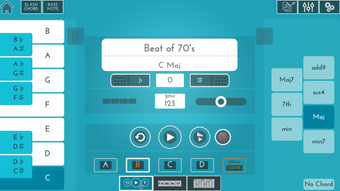
The user interface of xMure appears to be optimized for touch-based interaction on iPhone and iPad devices, featuring intuitive navigation and visual feedback for chord detection and arrangement changes. Users can expect a streamlined workflow where connecting a MIDI instrument triggers automatic recognition, followed by immediate access to genre selection, score import, and real-time manipulation tools.
Navigation is likely structured around a central dashboard that displays active tracks, current chord progressions, and available arrangement options. The app’s design emphasizes visual clarity and ease of access to core functions, minimizing the learning curve for new users. Performance is expected to be responsive during real-time audio processing, particularly when using the Harmony Poly Fragmentor algorithm, though exact resource usage details were not specified.
The developer did not provide additional system requirements or performance benchmarks. However, based on general software behavior, the app is expected to maintain stable operation during extended sessions, especially when handling real instrument audio files. CPU and RAM usage patterns remain unknown, but the use of pre-recorded audio tracks may reduce processing overhead compared to real-time synthesis. Stability during live performance scenarios is likely prioritized, given the app’s focus on interactive music creation.
Compatibility & System Requirements
xMure is compatible with iPhone and iPad devices, supporting the latest iOS versions as of its release date. The application has a file size of 74.6 MB, indicating a lightweight installation that should not significantly impact device storage. The software version is 1.2.0, released on May 20, 2024.
Exact system requirements were not listed. Compatibility information is limited to the supported platforms: iPhone and iPad. Users should ensure their device meets the minimum iOS version required for the app to function. The developer did not specify hardware requirements such as processor speed, RAM, or storage capacity beyond the total file size.
For optimal performance, it is recommended to use the app on devices with recent hardware and updated operating systems. Connection via USB MIDI cable is supported, suggesting compatibility with devices that have a USB-C or Lightning port, depending on the model.
Pros and Cons
Pros
- Free to download and use with no hidden costs
- Uses real instrument recordings for authentic audio quality
- Supports USB MIDI connectivity for professional-grade input
- Features a unique Tribute Band simulation mode
- Offers real-time chord detection and genre-based arrangement
- Allows import of music scores from online sources
- Lightweight installation at 74.6 MB
Cons
- Compatibility with specific iOS versions not clearly documented
- No information on supported MIDI hardware models
- Performance under heavy audio processing not verified
- Limited to iPhone and iPad platforms
- Exact system requirements were not provided
FAQ Section
Is xMure available for Android devices?
Currently, xMure is only available for iPhone and iPad devices. There is no official support for Android platforms.
Can I use xMure without a MIDI instrument?
Yes, the app supports touch screen input for playing notes and chords, allowing users to create music without external hardware.
Is the app secure and private?
While the app uses real instrument audio and connects to external devices, detailed information about data handling and privacy practices is available through the official terms of service and privacy policy links provided by the developer.
Does xMure require an internet connection?
Basic functionality such as chord detection and arrangement can be performed offline. However, importing music scores from the internet requires an active connection.
How often does xMure receive updates?
The app was last updated on May 20, 2024. Users can expect future updates to be released as part of ongoing development, though specific update schedules are not publicly disclosed.
Final Thoughts + CTA
xMure stands out as a unique music arranger that blends real instrument audio with intelligent chord detection and genre-based re-arrangement. Its ability to transform users into virtual tribute band leaders, combined with support for USB MIDI and score import, makes it a compelling tool for both casual creators and aspiring musicians. The app’s focus on authenticity through real recordings rather than synthetic sounds adds a professional edge to its output.
While system requirements and hardware compatibility details are limited, the lightweight size and platform-specific availability suggest it’s designed for modern iOS devices. The free pricing model enhances accessibility, making it a strong choice for those exploring music production without investment.
For anyone looking to experiment with music arrangement, lead a virtual band, or turn existing songs into new genres, xMure delivers a fresh and engaging experience. Download xMure now to begin your musical journey.







